The Call of Duty franchise continues to expand its universe of operators and cross‑title rewards, and one of the most talked‑about unlocks arrived when Activision bridged Call of Duty: Black Ops Cold War and Call of Duty Mobile. Through the Black Ops Cold War Open Beta, players gained the opportunity to add a brand‑new CIA operator, Russell Adler, to their Mobile roster at no extra cost. This guide walks through every step required to claim this master of deception directly inside COD Mobile.
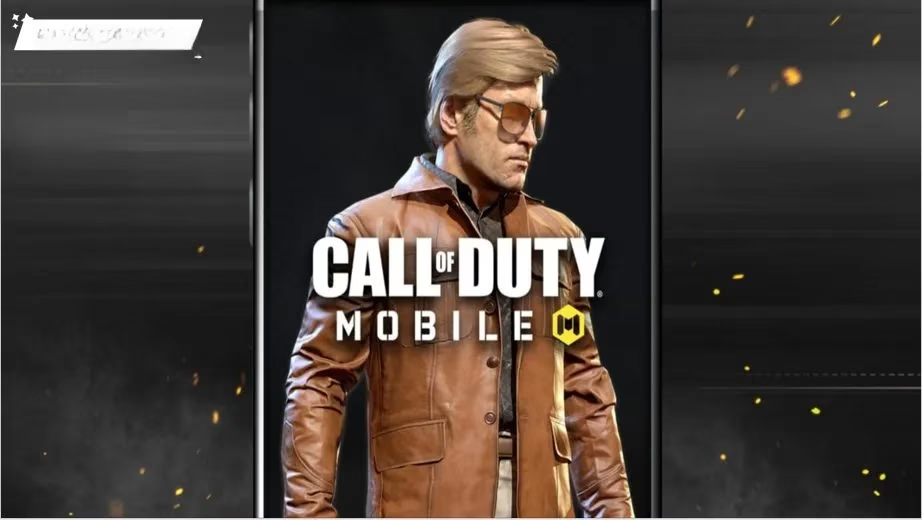
Russell Adler is not just another skin. He is a central figure in the Black Ops Cold War narrative, a CIA agent tasked with tracking down the elusive Soviet spy known only as Perseus. Described by those who know him as “America’s monster” with a sharp, dark charisma, Adler operates in the grey zones of espionage where morality bends and the mission always comes first. Before his full debut on November 13, the Beta gave players an early look at this ringleader who commands Frank Woods and his team through the next generation of global conflict. In COD Mobile, Adler is a fully playable Operator usable in both Multiplayer and Battle Royale modes, bringing that same ruthless persona to handheld combat.

To add Adler to a COD Mobile collection, a few prerequisites must be met before the Beta even begins. The entire process makes use of the Activision Account ecosystem, so the first essential step is linking a Call of Duty account to the COD Mobile profile. Inside the game’s Settings menu, there is a dedicated Call of Duty button. Tapping it opens a browser window where the player must enter the email address and password tied to an Activision Account and log in. This single account binding is what makes the cross‑game reward possible, so it is crucial to complete it before jumping into the Beta. Without the link, no unlock can be delivered.
Once the accounts are connected, the next stage is straightforward: download and play the Black Ops Cold War Open Beta using the exact same Activision Account. Platform preference does not matter at all. Whether on PlayStation, Xbox, or PC, any session spent in the Beta counts as long as the account matches. This flexibility meant console players and PC players alike could all secure Adler without worrying about format‑specific restrictions. The Beta itself was scheduled over several days with early access windows for pre‑orders and separate open periods for everyone else, but all play periods were eligible for the reward.
After the Beta concludes, patience becomes key. Activision sends out unique unlock codes roughly one week after the event ends. The code is delivered to the email address linked to the Activision Account—the same email used throughout the setup. One common pitfall is that these messages sometimes land in spam or promotional folders, so every folder must be checked thoroughly. The subject line may not immediately signal a game reward, so a careful scan of all recent emails is strongly advised.
With the code safely in hand, the player must visit the Call of Duty Redemption Center. Here, two pieces of information are required: the unique code itself and the UID, or User ID, found inside the COD Mobile profile directly beneath the in‑game username. The UID is a long numerical string that identifies the exact account. After entering both correctly, the redemption ties Adler permanently to that profile. The final step happens back inside COD Mobile. Heading to the in‑game mailbox reveals the new operator waiting as a message attachment. A single tap claims Adler, and he instantly becomes selectable in both multiplayer and battle royale lobbies. It is a seamless handoff between console/PC and mobile.
A vital but often overlooked detail is the game version. To successfully redeem the code, the latest update of Call of Duty Mobile must be installed. Running an outdated build can cause the mailbox to remain empty or the redemption to fail without a clear error. Before attempting to claim Adler, visiting the App Store or Google Play Store for updates saves time and frustration. This requirement also ensures that all the operator’s animations, voice lines, and customisation options appear correctly.
Russell Adler’s arrival in COD Mobile marked one of the earliest major link‑up events between the mainline Black Ops series and the mobile edition. The method highlighted the deepening integration of the Call of Duty ecosystem, where progress and exclusive cosmetics can travel between platforms. While the Beta event itself was time‑limited, the steps described remain a reference for how such rewards were structured, and the process may mirror future cross‑title promotions. The combination of account linking, participation in a specific hands‑on window, and code redemption demonstrates a model that Activision continues to refine. For players who want to stay ahead in collecting rare operators, keeping an eye on these limited‑time windows and always maintaining an up‑to‑date, linked Activision Account becomes the foundation of a versatile Mobile squad.
In summary, the path to unlocking Russell Adler without spending a single COD Point boiled down to five clear actions: link an Activision Account inside COD Mobile settings, play the Black Ops Cold War Beta on that same account, retrieve the unlock code from email a week later, redeem it at the official Call of Duty Redemption Center using a UID, and finally claim the operator from the in‑game mailbox. Mastery of these steps turned a fleeting Beta into a permanent asset on mobile devices, blending Cold War intrigue with fast‑paced handheld warfare.